
Product review
Brother P-touch PT-D610BT Review: 24 mm Labels by App (2026)
We may earn a commission when you buy through links on this page, at no extra cost to you. Affiliate disclosure
The Brother PT-D610BT suits home organizers and small shops that want 24 mm laminated TZe labels from a keyboard, phone or computer. Skip it if you only print narrow 12 mm labels.
Who this helps: This review helps you decide whether the PT-D610BT fits your labeling jobs. It is desk research from Brother documentation, not a hands-on test, and tape choices always depend on the surface you label.
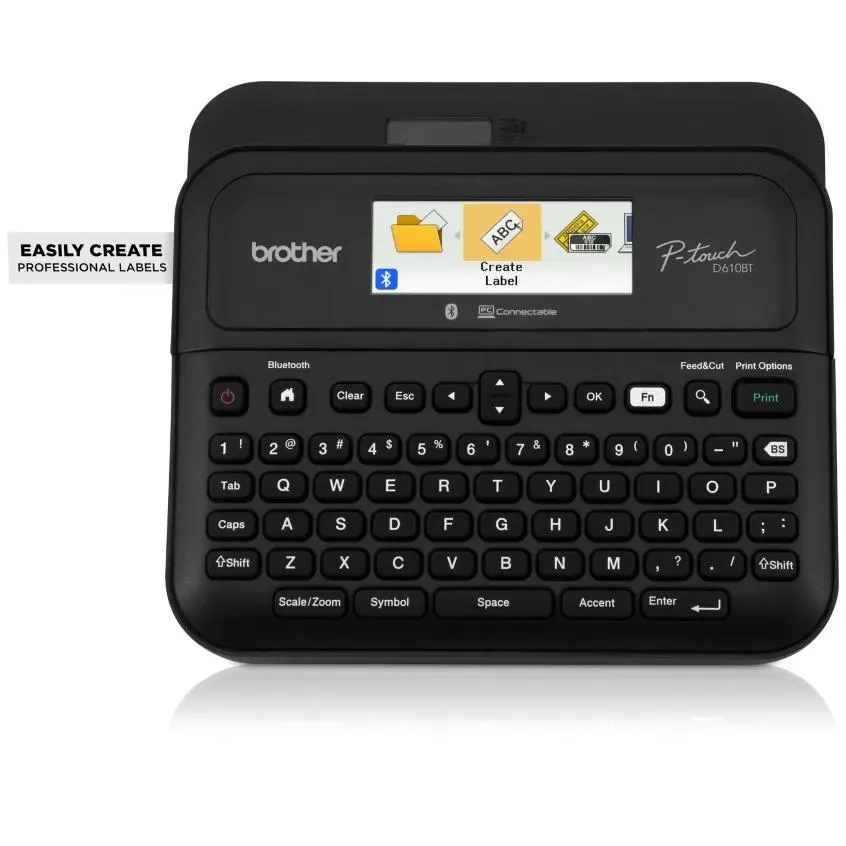
Product at a glance
Brother P-touch PT-D610BT Business Professional Connected Label Maker
A desktop TZe label printer for organizers and small shops who need wide, multi-line labels and want to design them on a phone or computer.
Verdict: who the PT-D610BT is for
The PT-D610BT is a good fit when you need wide, durable labels for bins, shelves, cables and files, and you want to design them on a phone or computer as well as on the built-in keyboard. It prints on Brother TZe laminated tape from 3.5 mm up to 24 mm wide, according to Brother's specifications.
The 24 mm maximum matters most. It gives room for up to seven lines of text, which suits storage bins that need a title plus a short contents list. Bluetooth 5.0 and USB let you lay out labels with more fonts and symbols than a keyboard screen allows.
People who only label spice jars or narrow cables may not need the extra width. A smaller TZe machine that tops out at 12 mm uses the same tape family and takes less desk space.
Verified specifications
The machine prints at 180 x 360 dpi at up to 30 mm per second on six TZe tape widths, with an automatic cutter. The table collects the figures Brother publishes for the PT-D610BT.
| Attribute | PT-D610BT |
|---|---|
| Tape type | Brother TZe laminated tape |
| Tape widths | 3.5, 6, 9, 12, 18 and 24 mm |
| Maximum print height | 18 mm (0.71 in) on 24 mm tape |
| Lines on 24 mm tape | 1 to 7 |
| Print resolution | 180 x 360 dpi |
| Print speed | Up to 30 mm/s |
| Connectivity | Bluetooth 5.0 and USB |
| Display | Colour LCD, 20 characters x 2 lines |
| Cutter | Automatic |
Some Brother pages describe the wireless link as Bluetooth Classic and the support specifications list version 5.0. Those describe the same connection: a Bluetooth 5.0 radio using the Classic profile.
Tape fit: which TZe widths to buy

Choose the tape width by how far away the label must be read and how many lines it carries. TZe laminated tape is the standard choice because the print sits under a clear protective layer.
| Job | Suggested width | Why |
|---|---|---|
| Cable flags and small tools | 9 or 12 mm | Fits small surfaces without wrapping too far |
| File folders and drawers | 12 or 18 mm | One or two clear lines at arm's length |
| Storage bins and shelves | 18 or 24 mm | Room for a title and a short contents list |
| Warehouse or shop shelving | 24 mm | Largest text, readable from farther away |
If you already own Brother tape, check whether it is TZe before buying this printer. Our guide to which Brother P-touch printers use TZe tape explains how to read the cassette label and avoid buying the wrong family.
Designing labels: keyboard, phone or computer
You can type short labels on the machine and switch to a phone or computer for longer or repeated layouts. The colour LCD shows 20 characters across two lines, which is enough to check short text before printing.
- On the keyboard: quickest for one-off labels such as a single drawer or cable.
- By Bluetooth: useful when you want to design from a phone at the shelf you are labeling.
- By USB: suited to batches, such as a run of numbered bin labels, from a computer.
The automatic cutter trims each label, so batches do not need scissors. Leave a little tape at each end when you plan the layout, since the cut edge is where peeling usually starts.
Strengths and limitations
The main strengths are the 24 mm width, the three ways to design and the automatic cutter; the main limits are the desk-bound size and the reliance on TZe cassettes.
- Strengths: six tape widths up to 24 mm, up to seven lines, Bluetooth 5.0 plus USB, colour LCD and automatic cutting.
- Limitations: it is a desktop machine rather than a pocket labeler, and it only accepts Brother TZe tape.
- Unknown from the documentation we checked: the exact battery or adapter setup in every regional box, so confirm the contents for your market.
Readers who label a few items a year may find a basic handheld enough. Readers who label a whole garage or a shop stockroom get the most from the wider tape and the app workflow.
Before you buy: checklist
Run through these checks to confirm the PT-D610BT fits your plans before you order it.
- The widest label you need is 24 mm or narrower.
- Your existing Brother cassettes are TZe, or you are ready to buy TZe tape.
- You want to design labels on a phone or computer, not only on the keyboard.
- You have desk space for a desktop label printer.
- You confirmed the box contents for your region, such as the power adapter.
- You picked tape colours and widths for each job in the tape-fit table above.
FAQ
What tape does the Brother PT-D610BT use?
It uses Brother TZe laminated tape in 3.5, 6, 9, 12, 18 and 24 mm widths, according to Brother's specifications. Laminated TZe tape protects the print under a clear layer, which helps labels last on bins, shelves and tools. Older Brother tape families that are not TZe will not fit.
Can the PT-D610BT print from a phone?
Yes. Brother lists Bluetooth 5.0 connectivity, so you can design and send labels from a phone or tablet with Brother's labeling app. The printer also connects by USB to a computer for batch work, and you can still type short labels on its own keyboard.
How many lines fit on a 24 mm label?
Brother lists one to seven lines on 24 mm tape, with a maximum print height of 18 mm. More lines mean smaller text, so for a bin you read from across a room, two or three lines usually stay more legible than seven.
Is the PT-D610BT fast enough for batches?
Brother rates the print speed at up to 30 mm per second, and the automatic cutter separates each label. For a run of numbered bin or shelf labels, designing the batch on a computer over USB is the most efficient way to use it.
Who should choose a smaller label maker instead?
If you only need narrow labels up to 12 mm for cables, jars or small tools, a compact TZe machine is enough and takes less space. The PT-D610BT earns its desk space when you need 18 or 24 mm labels and design many of them.
Sources
- Brother support: PT-D610BT specifications — checked 2026-11-20
- Brother USA: PT-D610BT product page — checked 2026-11-20
- Brother Australia: PT-D610BT — checked 2026-11-20
Ready to decide?
Check the current listing for the Brother P-touch PT-D610BT Business Professional Connected Label Maker on Amazon.
View on Amazon